Camera, Rear: Installation: Bezel
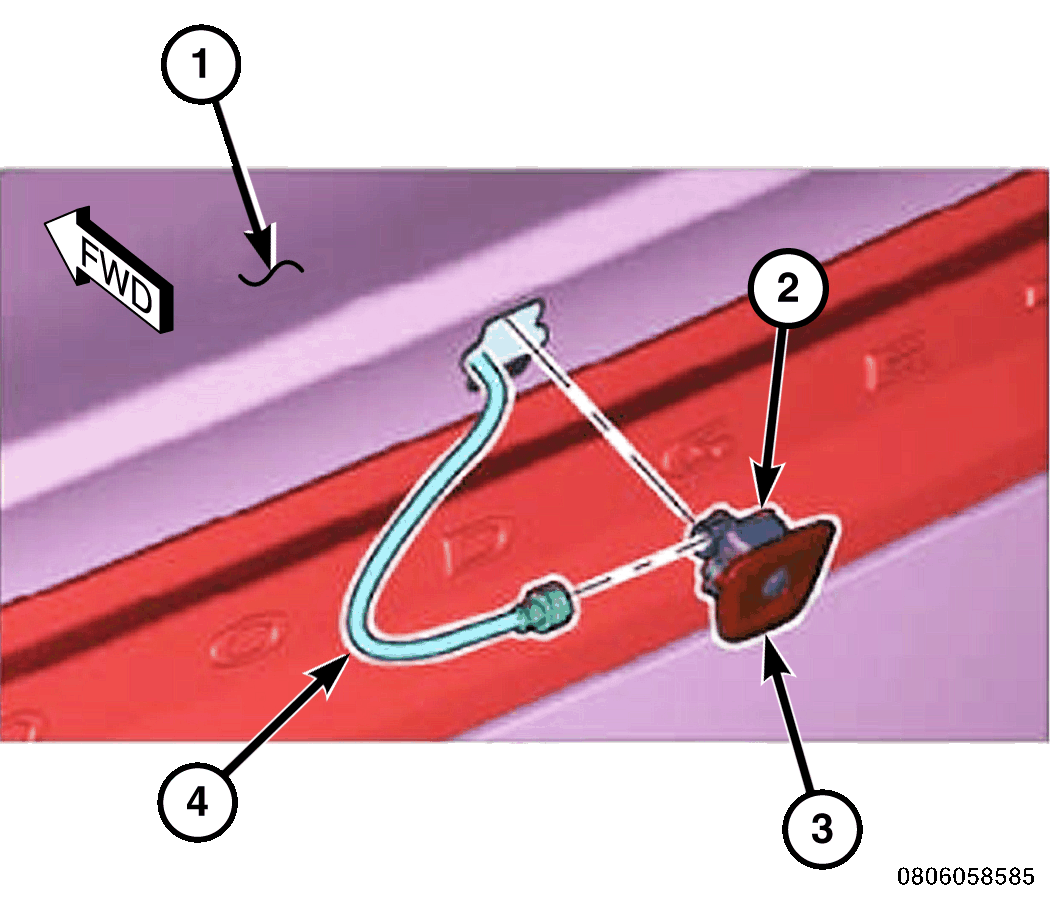
NOTE:
The Rear View Camera (RVC) is secured by screws to the back of the camera bezel and may be serviced without disturbing the bezel. The camera bezel is secured to the outer surface of the deck lid by an adhesive membrane and must be replaced with a new bezel and adhesive membrane unit if damaged or removed from the deck lid.
- Thoroughly clean the outer surface of the deck lid (1) around the camera mounting hole to be certain it is free of old adhesive residue, wax or grease.
- Remove the release paper from the adhesive membrane of the new camera bezel (3).
- Carefully align the camera bezel with the mounting hole in the deck lid, then insert the bezel into the mounting hole.
- Use the palm of your hand to press the bezel against the deck lid. Apply firm and even pressure to the bezel for about 10 to 15 seconds to be certain of good adhesion.
- Working from the inside of the deck lid, reinstall the Rear View Camera (RVC) (2) onto the back of the camera bezel. Refer to CAMERA, REAR, INSTALLATION .
- Reconnect the negative cable to the battery. If equipped with an Intelligent Battery Sensor (IBS), reconnect the IBS connector.