UAS, UAQ, UCS And UCQ Radio Enhancements (08-113-18)
Reference number: 08-113-18
Supersedes refnos: 08-016-19, 08-016-19 REV. A, 08-016-19 REV. B, 08-016-19 REV. C, 08-016-19 REV. D, 08-016-19 REV. E, 08-016-19 REV. F
UAS, UAQ, UCS AND UCQ RADIO ENHANCEMENTS
TECHNICAL SERVICE BULLETIN
| CHRYSLER: | 2018 Jeep Compass (MP); 2018 Jeep Renegade (BU); 2018 Dodge Challenger (LA); 2018 Dodge Charger (LD); 2018 Chrysler 300 (LX); 2018 Dodge Durango (WD); 2018 Jeep Grand Cherokee (WK); 2018 RAM 1500 Pickup (DS); 2018 RAM 3500 Pickup (D2); 2018 RAM 3500 Cab Chassis (DD); 2018 RAM 3500 <10K Cab Chassis (DF); 2018 RAM 2500 Pickup (DJ); 2018 RAM 4500/5500 Cab Chassis (DP); |
| GROUP: | 08 - Electrical |
This Service Bulletin is also being released as Rapid Response Transmittal (RRT) 18-091 Date September 06, 2018. All applicable Sold and Un-Sold RRT VINs have been loaded. To verify this RRT service action is applicable to the vehicle, use VIP or perform a VIN search in DealerCONNECT/Service Library. All repairs are reimbursable within the provisions of warranty.
OVERVIEW
This bulletin involves inspecting and if required, updating the radio software level to:
- 22.6 - DS, D2, DP, DD, DF and DJ vehicle with UAS, UCQ and UAQ radio.
- 22.5 - LA, LD and LX vehicle with UAS and UAQ.
- 21.9 - All other vehicles and radios.
MODELS
| 2018 | (MP) | Jeep Compass |
| 2018 | (BU) | Jeep Renegade |
| 2018 | (LA) | Dodge Challenger |
| 2018 | (LD) | Dodge Charger |
| 2018 | (LX) | Chrysler 300 |
| 2018 | (WD) | Dodge Durango |
| 2018 | (WK) | Jeep Grand Cherokee |
| 2018 | (DS) | RAM 1500 Pickup |
| 2018 | (D2) | RAM 3500 Pickup |
| 2018 | (DD) | RAM 3500 Cab Chassis |
| 2018 | (DF) | RAM 3500 <10K Cab Chassis |
| 2018 | (DJ) | RAM 2500 Pickup |
| 2018 | (DP) | RAM 4500/5500 Cab Chassis |
- Uconnect 4C Nav With 8.4" Display (Sales Code UAQ or UCQ).
- Uconnect 4C With 8.4" Display (Sales Code UAS or UCS).
SYMPTOM/CONDITION
Customers may experience one or more of the following:
- Audio Distortion (DS, D2, DP, DD, DF and DJ vehicle with UAS, UCQ and UAQ radio).
- Menu bar at the bottom of the radio display is frozen (LA, LD and LX with UAQ and UAS radios).
- Can not change the time on the clock (LA, LD and LX with UAS radios).
- Anti-theft code request message.
- Backup camera screen is blank.
- Lines appear across screen.
- Radio control screen is blank or locked.
- Radio resets intermittently.
- Unable to adjust volume.
- Radio will not switch modes between AM, FM, SAT or Media.
In addition, the following enhancements are included in this update:
- Carplay® connectivity improvements.
- Improvement to Bluetooth phone pairing.
- Improved sound quality when using a Bluetooth phone.
DIAGNOSIS
Using a Scan Tool (wiTECH) with the appropriate Diagnostic Procedures available in DealerCONNECT/Service Library, verify all related systems are functioning as designed. If Diagnostic Trouble Codes (DTCs) or symptom conditions, other than the ones listed above are present, record the issues on the repair order and repair as necessary before proceeding further with this bulletin.
If a customer's VIN is listed in VIP or your RRT VIN list, perform the inspection. If any vehicle not on the VIN list exhibits the symptom/condition, perform the inspection.
INSPECTION
- Verify the radio software version. Radio must be in Dealer Mode to verify by following these steps:
- Push and hold the Front Defrost, Driver Temperature Up and Temperature Down buttons simultaneously until the Dealer Mode screen appears (approximately seven seconds). Release buttons.
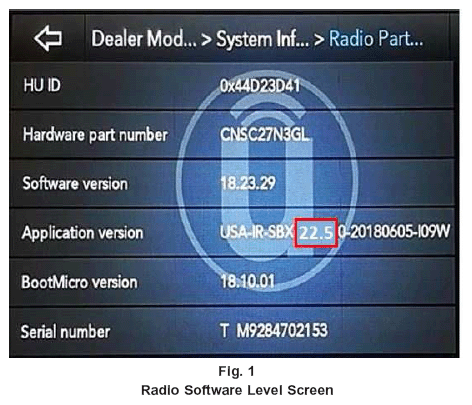
- Select "Radio Part Information". The software version will be listed next to "Application Version" (Fig. 1) .
- Is the current radio software level at or higher than?
- 22.6 - DS, D2, DP, DD, DF and DJ vehicle with UAS, UCQ and UAQ radio.
- 22.5 - LA, LD and LX vehicle with UAS and UAQ.
- 21.9 - All other vehicles and radios.
- YES >>> The radio software is already up to date. This bulletin has been completed, use inspect LOP (18-60-02-VK) to close the active RRT.
- NO >>> The radio software needs to be updated. Back out of Dealer Mode and proceed to Step 1 of the Repair Procedure.
REPAIR PROCEDURE
- Has a 16GB
USB flash drive been created?
- YES >>> Proceed to Step 10 .
- NO >>> Proceed to Step 2 .
- Go to DealerCONNECT>Service>Uconnect Command Center>Uconnect>More Information>Dealer software downloads to download the files.
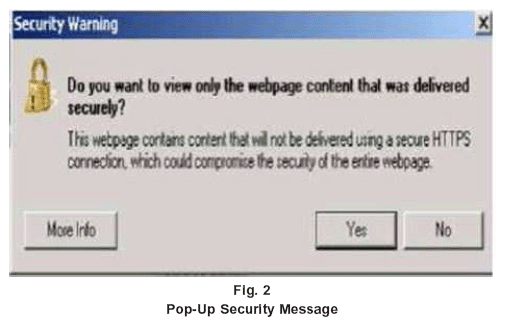
- If a security message appears "Do you want to view only the web page content that was delivered securely?" (Fig. 2)
. Press "No" to continue.NOTE: If the software cannot be downloaded, make sure you have proper security access. If not, have the Service Manager or Shop Foreman download the software update.
- Use a blank USB flash drive with at least 16GB of space. Follow the on-screen instructions to download the software files.
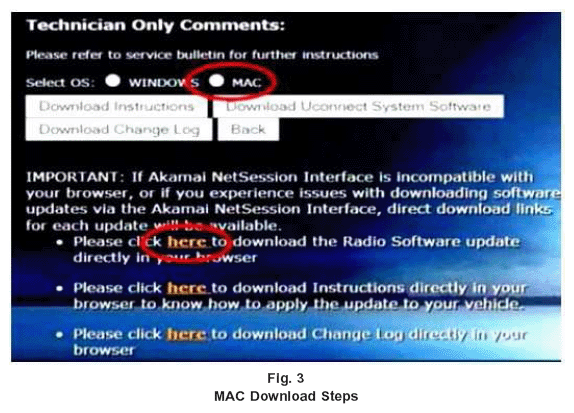
- Download the software update file to your local PC's desktop. Make sure to select the "MAC" radial button for all downloads (Fig. 3)
.
- Be sure to download the file to your designated folder before extracting the zip file to the blank USB flash drive.
- A blank USB flash drive will be needed for each radio update, additional updates can not be on the same USB flash drive.
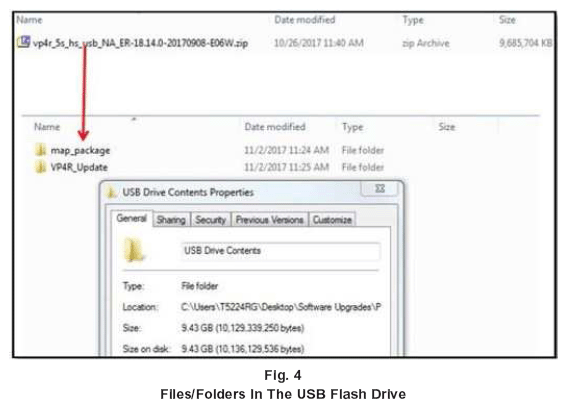
- Unzip all the files to the root folder of USB flash drive. Files should not be within a zip folder. Your USB files should look like (Fig. 4)
when you open it, displaying multiple files/folders.
- Once the file is extracted to the USB flash drive, it is recommended to label the USB flash drive with the bulletin number and proper radio Sales Codes.
- Start the vehicle and insert the correct USB flash drive with new software into the USB port.CAUTION: Make sure no other device is plugged into any of the USB ports while performing this re-program. If other devices are connected to USB ports during re-programming, it may cause failure of files to be loaded which may cause the radio to need replacement.NOTE: This software will update the radio to, version:
- 22.6 - DS, D2, DP, DD, DF and DJ vehicle with UAS, UAQ and UCQ radio.
- 22.5 - LA, LD and LX vehicle with UAS and UAQ.
- 21.9 - All other vehicles and radios.
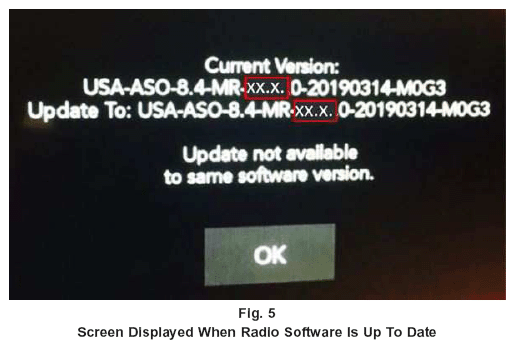
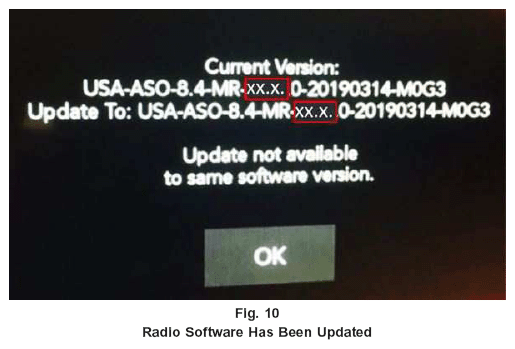
- If the radio software is up to date, the "Current Version" and "Update To" will be the same (Fig. 5)
. Press "OK" and remove the USB flash drive.
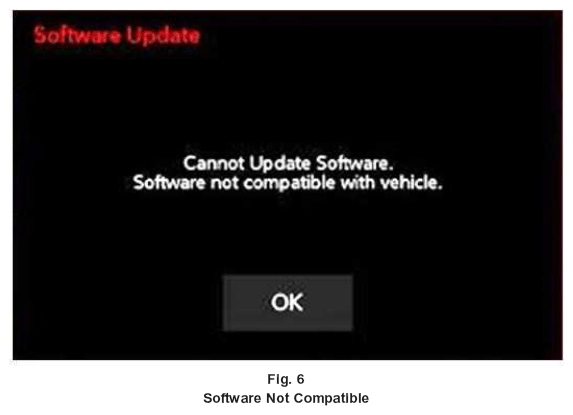
- If the screen in (Fig. 6)
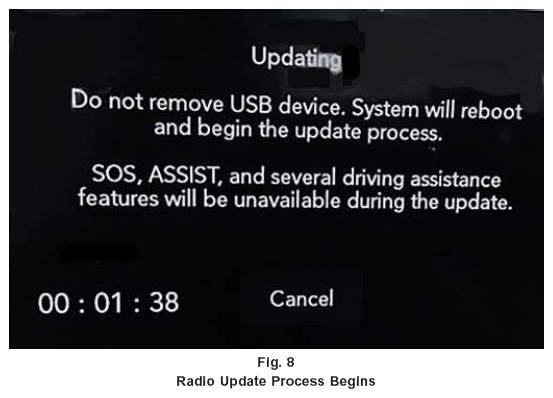
is displayed, the USB flash drive was not set up correctly. Use a top name brand USB and create a new flash drive and start the update again.NOTE: Do not turn off the ignition until the two minute timer has expired, as seen in (Fig. 8) .
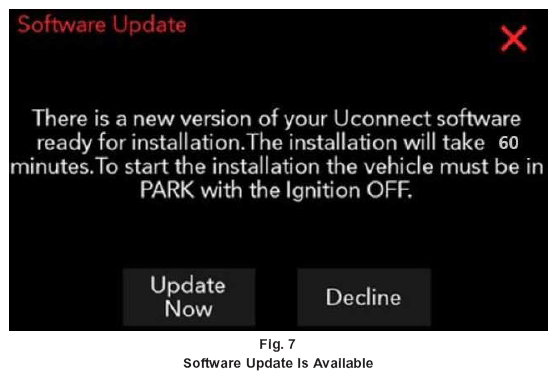
- Once the system has verified there is an available update, touch the "Update Now" button. Make sure the vehicle is in park, do NOT turn off the ignition at this point
, (Fig. 7)
.
- The ignition must be turned to the off position before
the two minute timer has expired, or the update may be canceled, (Fig. 8)
.
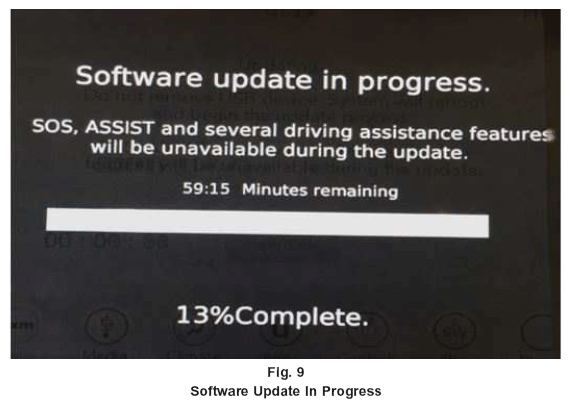
- The radio will reboot and the update will begin. The update should only take 20 minutes, the timer on the screen may display the incorrect time remaining, (Fig. 9)
.
- After the update has completed, the radio will shut down. With the USB flash drive still inserted in the USB port, turn the ignition back to the run position. If the radio has been updated correctly, the screen in (Fig. 10)
will be displayed. Press "OK" and remove the USB flash drive.NOTE: The vehicle may require a 40 minute sleep cycle to return to full functionality.NOTE: After performing the radio update, the radio display screen may have a ghost image that will not clear, even after turning off the ignition. This ghost image may appear on any radio screens selected. Do not replace the radio for this concern. Turn the vehicle off and allow the radio and vehicle to enter a full power down cycle. A full power down cycle may take between 45 to 60 minutes.
POLICY
Reimbursable within the provisions of the warranty.
TIME ALLOWANCE
| Labor Operation No: | Description | Skill Category | Amount |
|---|---|---|---|
| 18-60-02-BN | Radio, Software - Create USB Flash Drive (Sales code UAQ) DS, D2, DP, DD, DF and DJ Vehicles (One Time Only) (0 - Introduction) |
6 - Electrical and Body Systems | 0.2 Hrs. |
| 18-60-02-BP | Radio, Software - Create USB Flash Drive (Sales code UCQ) DS, D2, DP, DD, DF and DJ Vehicles (One Time Only) (0 - Introduction) |
6 - Electrical and Body Systems | 0.2 Hrs. |
| 18-60-02-BQ | Radio, Check Software Level and Perform Software Update (Sales Codes UCQ and UAQ) DS, D2, DP, DD, DF and DJ Vehicles (0 - Introduction) |
6 - Electrical and Body Systems | 0.5 Hrs |
| 18-60-02-VK | Radio, Check Software Level (0 - Introduction) |
6 - Electrical and Body Systems | 0.2 Hrs. |
| 18-60-02-YW | Radio, Software - Create USB Flash Drive (Sales code UAS) (One Time Only) (0 - Introduction) |
6 - Electrical and Body Systems | 0.3 Hrs |
| 18-60-02-YT | Radio, Software - Create USB Flash Drive (Sales code UAQ) (One Time Only) (0 - Introduction) |
6 - Electrical and Body Systems | 1.3 Hrs. |
| 18-60-02-VN | Radio, Software - Create USB Flash Drive (Sales code UCQ) (One Time Only) (0 - Introduction) |
6 - Electrical and Body Systems | 1.9 Hrs. |
| 18-60-02-VT | Radio, Software - Create USB Flash Drive (Sales code UCS) (One Time Only) (0 - Introduction) |
6 - Electrical and Body Systems | 0.2 Hrs. |
| 18-60-02-YV | Radio, Check Software Level and Perform Software Update (Sales Codes UAS and UAQ) (0 - Introduction) |
6 - Electrical and Body Systems | 0.6 Hrs. |
| 18-60-02-VP | Radio, Check Software Level and Perform Software Update (Sales Codes UCS) (0 - Introduction) |
6 - Electrical and Body Systems | 0.5 Hrs. |
| 18-60-02-VQ | Radio, Check Software Level and Perform Software Update (Sales Codes UCQ (0 - Introduction) | 6 - Electrical and Body Systems | 1.0 Hrs. |
FAILURE CODE
The dealer must choose which failure code to use depending on if this is a Rapid Response Transmittal (RRT) or Service Bulletin.
- The "RF" failure code is required for essential module flash/reprogramming and can only be used after confirmation that the VIN is included on the RRT.
- The failure code "RF" (Required Flash) can no longer be used on Service Bulletin flashes. The "RF" failure code must be used on an RRT .
- If the customer's concern matches the SYMPTOM/CONDITION identified in the Service Bulletin, failure code CC is to be used. When utilizing this failure code, the 3C's must be supplied.
| RF | Required Flash - RRT |
| CC | Customer Concern |